A dashboard for Home Assistant
Orb
Soft, round cards you read at a glance. Every device in your house, room by room, laid out for you.
- Open in Home Assistant (opens in a new tab)Download Orb from the Marketplace, or HACS before Home Assistant 2026.11.
- How it installsThree steps, all in Home Assistant. No terminal, no YAML.
It runs live on a demo house: press, slide and scroll it.
Installed in three steps
All of it in Home Assistant 2026.5 or newer, in your browser, as an administrator. Nothing to install on your computer, no token to copy, and it never changes a dashboard you already have.
Prefer a terminal, or deploying from CI? Deploy from the command line instead. Pick one way: both at once would load Orb twice.
- Download itOpen Orb in your Home Assistant's Marketplace and press Download. Before Home Assistant 2026.11 it opens in HACS, which you install first. If it asks, add it as a custom repository of type Dashboard.
- Reload the tabSo Home Assistant loads what it just installed.
- Add the dashboardSettings, Dashboards, Add dashboard: pick Orb under Community dashboards and press Create. It opens from the sidebar, laid out by area.
How it looks
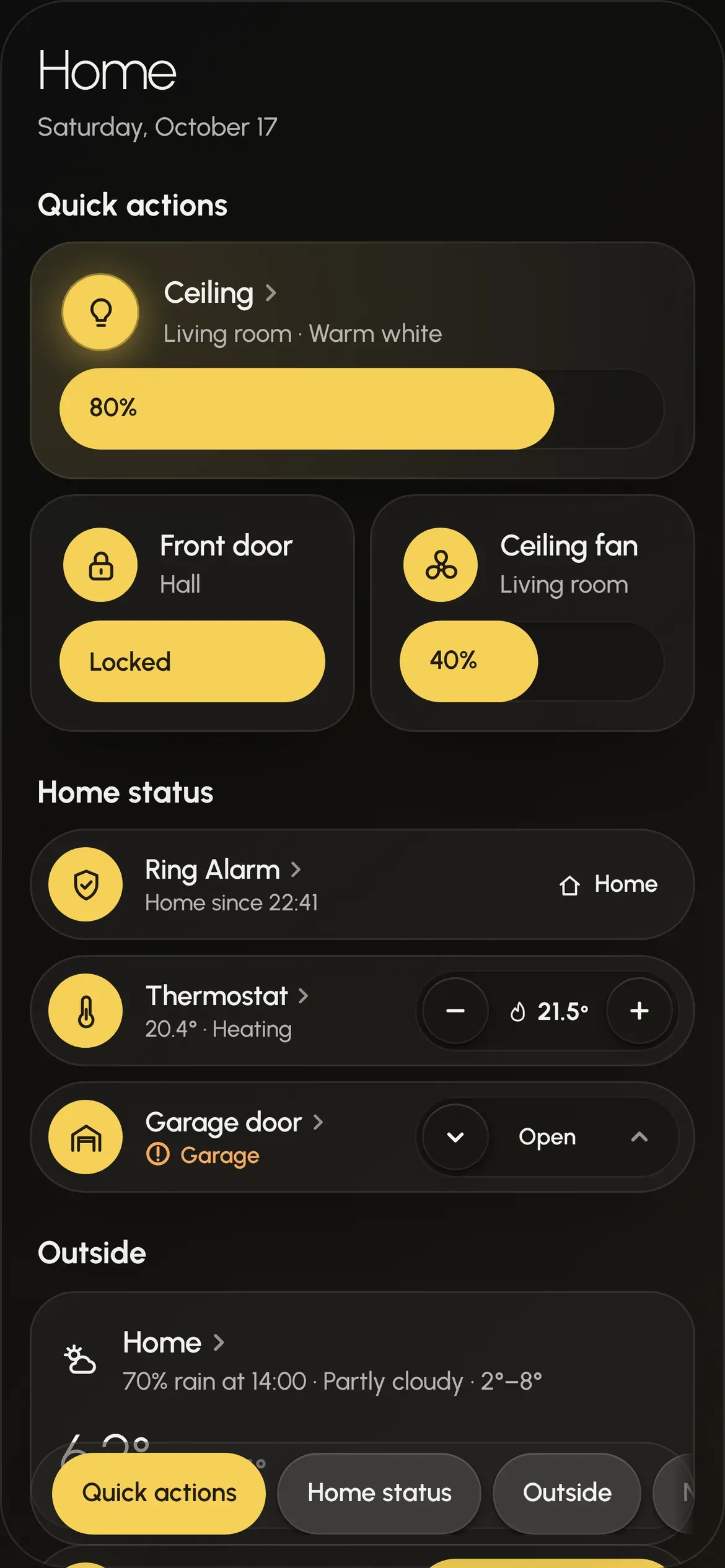
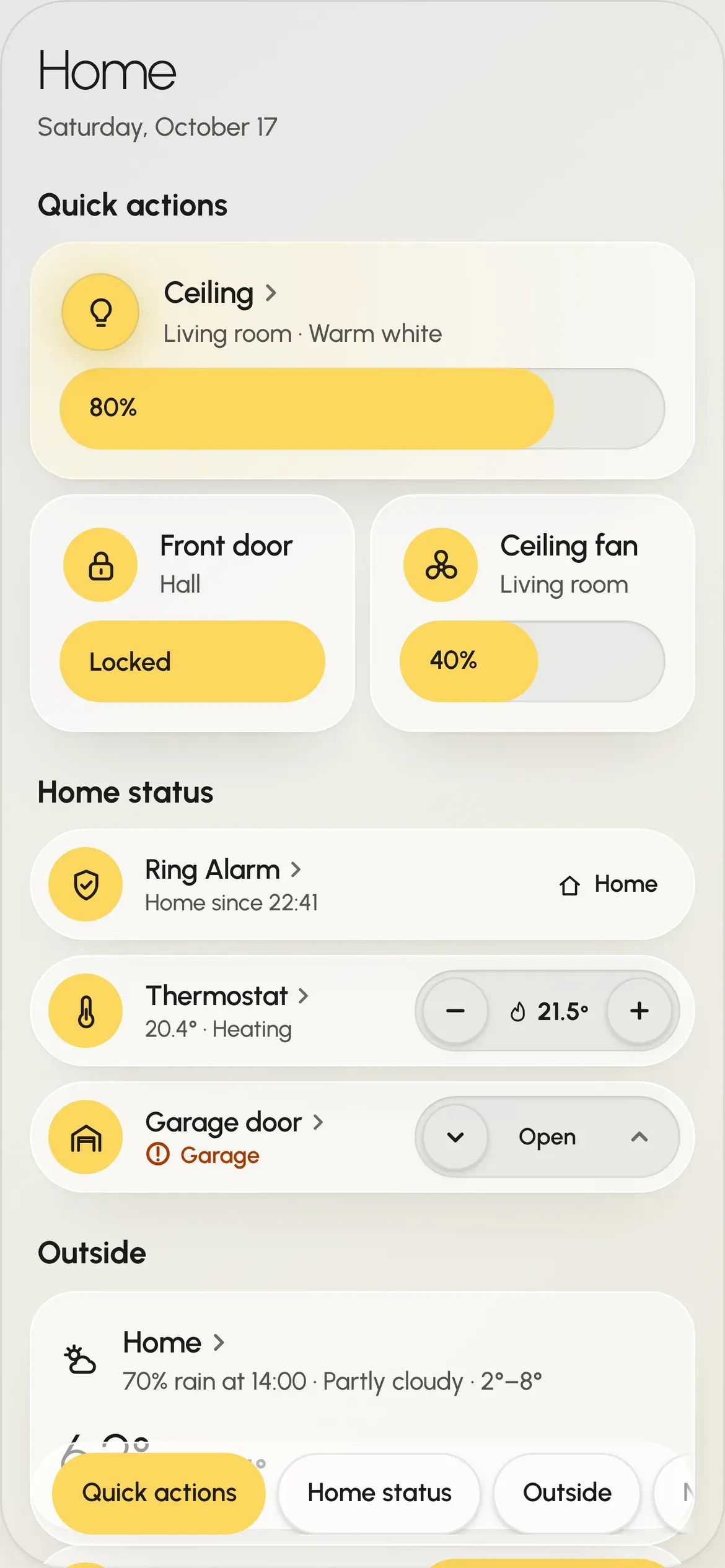
Section titled “How it looks”Each card has a round button for its main action. Lights, climate and covers get a slider or stepper beside it, and readings show a big figure. The yellow accent shows what is on, and a dashed outline means a device is unavailable. Tap a card’s name, or press and hold its button, to open more in a sheet. Cards that belong together, like a nursery’s sound machine, night light and white noise, can join into one.
It follows Home Assistant’s light or dark mode, and reads the same on a phone in your hand and a wall panel across the room: a card never changes height when its state changes, so nothing jumps when a light turns on. The tablet below is live, on a demo house.
Tablet layout. It is 1180 px wide, so it shows on a larger screen. Open it in Storybook
What it draws
Section titled “What it draws”Lights, climate, covers, switches and input_boolean modes, sensors, the weather, alarm panels, locks, humidifiers,
fans, sound machines, Owlet socks and guest Wi-Fi. An entity without a card isn’t drawn. Every card in every state is
in Storybook, and Warnings and alarms shows how Orb tells you
something is wrong.
Settings
Section titled “Settings”Open the dashboard and press Edit dashboard (the pencil, or ⋮). Its dialog opens on the dashboard’s configuration in YAML; add to it and save:
# Orb's dashboard, as Add dashboard → Orb saves it, plus the options you can add.strategy: type: custom:orb-dashboard viewing: far # near (default) for a phone or tablet, far for a wall panel theme: dark # home-assistant (default), auto, light or dark| Key | What it does |
|---|---|
viewing |
near (default): a phone or tablet in the hand. far: a wall panel read from across the room. |
theme |
home-assistant (default) follows Home Assistant’s light or dark mode; auto follows the device; light and dark hold one. |
title |
The title the page prints in its header. Home by default. |
To lay out your own cards and rows instead, take control of the dashboard (the same dialog’s ⋮ → Take control), which keeps Orb’s card as it is now, and edit it; Lay it out in YAML shows how. A dashboard you take control of no longer lays itself out.
From a terminal or CI, @dashhaus/orb and the deploy tool create Orb’s dashboard and one of your own rows in one
command: Deploy from the command line. Pick one way: each loads its own copy of Orb.
If something goes wrong
Section titled “If something goes wrong”If Add dashboard has no Orb under Community dashboards, or the dashboard says Custom element doesn't exist
or Timeout waiting for strategy element, Home Assistant hasn’t loaded Orb yet. Reload the tab. If that doesn’t help,
open Settings → Dashboards → ⋮ → Resources and check there’s a JavaScript module at
/hacsfiles/orb-dashboard/orb-dashboard.js.
Community dashboards are listed from Home Assistant 2026.5. On an older version, or one that keeps its dashboards in
YAML, create a dashboard yourself and give it strategy: { type: custom:orb-dashboard } as its whole configuration.
Update
Section titled “Update”The Marketplace (or HACS) tells you when there’s a new version of Orb. Update it there, then reload the tab. Your dashboard follows; Release notes say what changed and anything to do first.
Ask an assistant to do it
Section titled “Ask an assistant to do it”An assistant that can use your browser can follow this page on its own. Give it the page’s address, or this:
Install the Orb dashboard in my Home Assistant. I'm signed in as an administrator.1. Open https://my.home-assistant.io/redirect/hacs_repository/?owner=Krystosterone&repository=orb-dashboard&category=plugin and download Orb (type: Dashboard; add it as a custom repository if asked). Keep the defaults.2. Reload the browser tab.3. Settings → Dashboards → Add dashboard → under Community dashboards, pick "Orb" → Create.4. Open the new Orb dashboard from the sidebar and check it draws. Don't change any other dashboard, and never ask me for a password or token.